Welcome to myplan
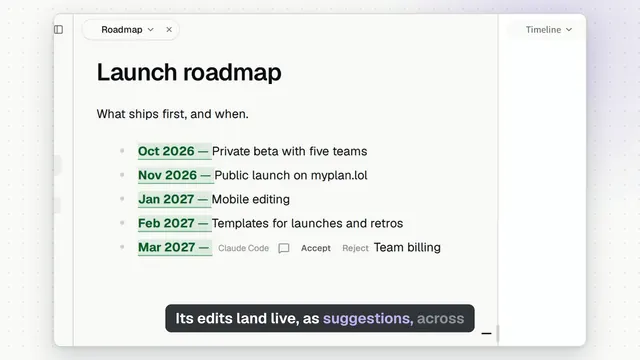
myplan is a shared plan for your team and your coding agents: notes and canvases you work on together, live. Agents suggest, people decide.
When signed in, existing notes open in Read, so a stray tap changes nothing. As a guest, your own notes start in Edit so you can try writing right away. To write in a note you are reading, select some text and choose Edit (or Edit note in the note's title menu); Done by the title stops. Turn on Open notes in Edit in the command menu (⌘K) to always start in Edit.
Try it
Type anywhere in this note while it is in Edit; everyone here sees it as you type.
Select some text and choose Comment to start a discussion.
Draw on the canvas beside this note.
Use Share to invite people with a view, comment or edit link.
Connect your coding agent
Run the command where your coding app runs, including on a remote server. For Codex:
npx myplan codexFor Claude Code:
npx myplan claude-codeOpen the printed approval link in any browser. Sign in, choose the agent's access, and wait for Connection verified in the terminal. Then start a new session in your coding app and ask it to list your Myplan workspaces.
No localhost callback forwarding or separate app login is needed. Requires Node.js 22 or newer.
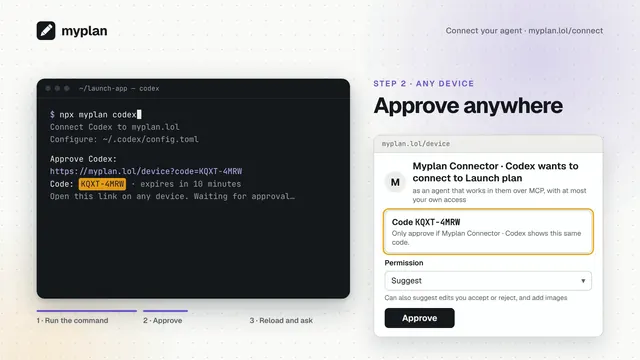
For other apps, open Share › Agents or read https://myplan.lol/connect.md.
Agent instructions: https://myplan.lol/skill.md.
How suggestions work
Agents suggest edits by default. Accept or reject each one in the note or in Activity. Give an agent edit permission when you want it to write directly.
Keep your work
This workspace is not saved to an account, and workspaces nobody opens for 30 days are deleted. Sign in to:
keep your workspaces on any device
connect an agent once for all your workspaces